Blog · AIKIZI Lab / Creative Tools
Glitch Art: Free Online Guide
Make glitch art, pixel sorting and databending effects for free online. AIKIZI Lab has 3 glitch tools with before and after examples.
Glitch art takes the language of digital failure and turns it into intention. Scan Lines that corrupt a portrait. Pixel sorting that melts a landscape into ribbons of color. Dithering that dissolves a photograph into stippled noise. These are not errors. They are controlled demolitions of visual information.
AIKIZI Image Glitch Lab
Three glitch engines in one lab. Image Glitch, Dither Engine, FX Engine.
Upload any image. Apply Scan Lines, pixel sorting, channel shifting, or chromatic aberration. Export instantly.
Image Glitch (open tool) — Pixel Sort, Block Sort, Channel Shift, Channel Swap, JPEG Corrupt, Data Mosh, Scan Lines, VHS Tracking, CRT Warp. Nine effects for the classic glitch aesthetic.
Dither Engine (open tool) — Floyd-Steinberg, Bayer, Blue Noise, Atkinson, and Stucki dithering algorithms. Reduces images to limited palettes with stippled grain.
FX Engine (open tool) — Halftone, ASCII, Contour, Voronoi, Dithering, Crosshatch, Dots, Edge Detect, Wave Lines, Matrix Rain, Pixel Sort, Blockify, Threshold, Noise Field, VHS. Fifteen stylization effects.
Before and After
Two portraits from the AIKIZI gallery, processed through Image Glitch Lab:
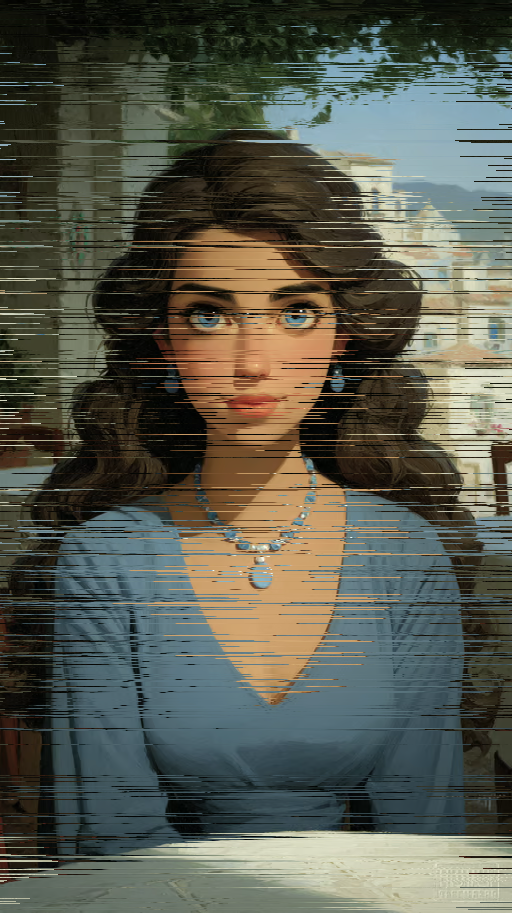
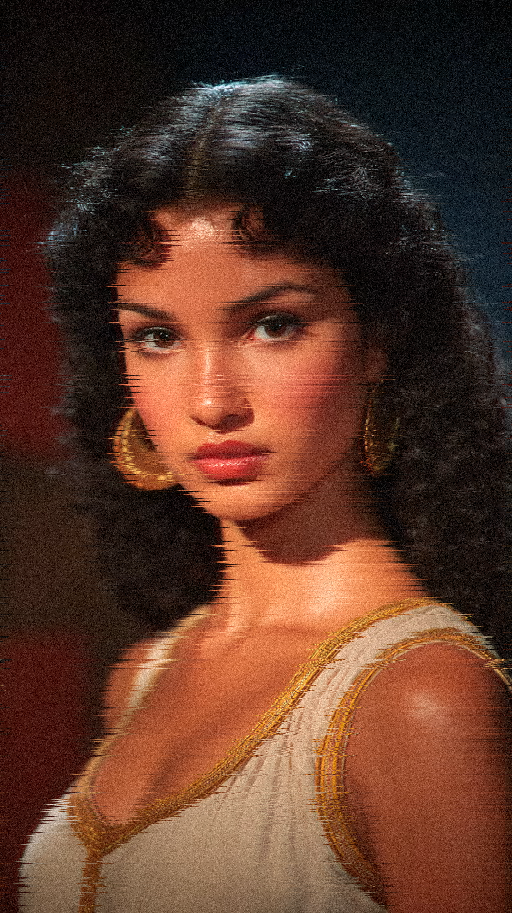
How It Works
All tools run in-browser, free, no signup required. Pick a tool, upload an image, adjust the sliders, and export the result as PNG.
The Decode Connection
Decode sees the glitched result as a complete image.
Color shifts become palette data. Distortion becomes texture analysis. The glitch becomes structured information.
Run your glitched image through Decode to see how the AI interprets the visual result. The analysis reads the distorted output as a complete image, cataloging the color shifts, textures, and visual patterns that the glitch process created.
Try it: Open any image in Image Glitch Lab, apply Scan Lines, save the result, then Decode it. The AI catalogs every visual element in the glitched output.
FAQ
What is glitch art?
Glitch art takes the language of digital failure and turns it into intention.
How can I make glitch art online for free?
All tools run in-browser, free, no signup required. Pick a tool, upload an image, adjust the sliders, and export the result as PNG.
What glitch effects can I apply to an image in AIKIZI Image Glitch Lab?
Upload any image. Apply Scan Lines, pixel sorting, channel shifting, or chromatic aberration.
Read next
-
Blog Sref vs Cref vs Iref in Midjourney V8.1, Explained
-
Blog CSS Gradient Generators 2026
-
Blog Vitrine of Impossible Materials
- aikizi.com/lab/dither-engine Lab Dither engine, in the AIKIZI Lab
- aikizi.com/lab/fx-engine Lab FX engine, in the AIKIZI Lab
- aikizi.com/lab/image-glitch Lab Image glitch, in the AIKIZI Lab