AIKIZI Lab · Woven Wind guide Open Woven Wind

Chapter eight

Keeping your rug

Three ways to keep what you made: a picture, a video from this moment, or one loop that plays forever without a seam.

First, the frameTwo menus in the top bar.

Before you save, pick the shape of the picture and how large it should be.

Frame

4:5 · 1:1 · 9:16 · 3:2 · 16:9. The frame changes the shape of the picture around the rug, not the rug itself. The screen shows exactly what will be saved.

Size

1080, 2160 or 4320 pixels wide; the height follows the frame. Pictures use the size as chosen. Videos shrink the largest sizes until they fit the H.264 format: a 4320-wide 4:5 video comes out 2718 × 3400, and at 60 frames a second a few of the largest sizes cannot be made at all.
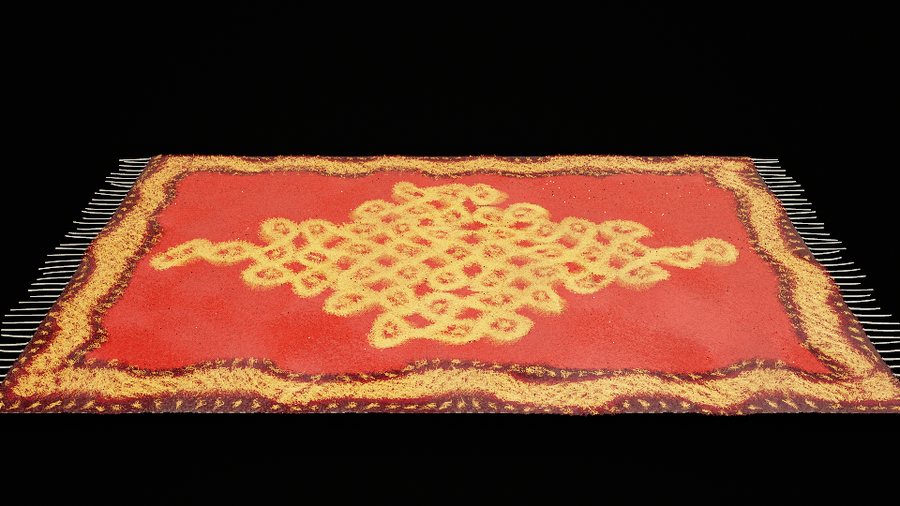
The same rug seen from its long side in a wide 16:9 frame
16:9the same rug, a wide frame

A pictureP or the png button

Saves the rug exactly as it is this instant, at the size you chose, without the panel or the brush ring.

Very large pictures are drawn in pieces and joined, so even 4320-wide pictures work on ordinary graphics chips.

For scale: a 1080 × 1350 picture is about 3 MB.

A video from nowV or the mp4 button

Records the rug going on from this moment: the weather keeps moving, even if paused, and the marks you made stay in, fading only as your fade setting says. The camera holds still, even with turn on, unless film is on: then the video follows the camera’s shots. Your hand is not recorded while it saves, and neither is sound, so the video is silent and keeps the weather’s own clock.

Choose its length (5, 10, 20 or 30 seconds) and 30 or 60 frames a second under video in the light tab.

Woven Wind makes the video itself, frame by frame, rather than filming your screen, so it is smooth even if your screen is not. It saves as an H.264 MP4 that plays almost anywhere.

For scale: a ten-second video at 1080 × 1350 is about 16.5 MB and takes about seven seconds to make on a fast laptop.

One seamless loopL or the loop button

A loop ends exactly where it began, so it can play forever without a visible jump.

The weather in Woven Wind runs on a clock that comes back to its starting point at the end of every loop. The pile follows that weather closely, but not perfectly. So before recording, Woven Wind lets the rug settle through two whole loops, remembers the first frame, and during the last second gently steers every thread back onto it.

The video lasts one loop: 6, 12, 20 or 40 seconds, set under loop in the wind tab. Marks do not fade while a loop is made, so what you drew stays. With film on, the camera’s shots close on the loop too.

Platea four-second loop · watch for the seam

Where files go

One export runs at a time, and once started it runs to the end. A thin line across the top of the window shows a video’s progress.

Files go into your browser’s usual downloads folder. Names say what they are: the mood, the motif, its seed and the size.

woven-wind-breeze-kolam-pulli-1080x1350.png
woven-wind-breeze-kolam-pulli-1080x1350-30fps-10s.mp4
woven-wind-breeze-kolam-pulli-loop-1080x1350-30fps-20s.mp4