AIKIZI Lab · Woven Wind guide Open Woven Wind

Chapter one

Before you begin

What Woven Wind needs from your computer, the whole screen in one picture, and six things to try in your first minute.

What you need

A laptop or desktop, a mouse or trackpad, and a browser that can use your graphics chip.

A browser with WebGPU

Woven Wind draws every thread on your graphics chip through WebGPU. Current Chrome and Edge have it. We test in Chrome. Safari and Firefox have added WebGPU recently, but Woven Wind has not been tested there yet.

A laptop or desktop screen works best

On a laptop or desktop the rug and the controls sit side by side. On a phone or small tablet the rug fills the screen and the controls open as a sheet from the bar at the bottom; your finger works as the hand. Most phone browsers have no WebGPU yet, though, so there you will usually see the one sentence below instead of the rug.

A graphics chip with some room

The first rug moves about 290,000 threads. On a recent laptop that runs smoothly. If yours struggles, lower knots or ply in the pile tab (chapter six).

Nothing else

There is nothing to install and no account. Everything happens inside your browser tab.
If it cannot start, Woven Wind says why on the screen. Without WebGPU you will see:

“This tool needs WebGPU. Open Woven Wind in a recent Chrome to weave the rug.”

The screenThirteen places, one picture.

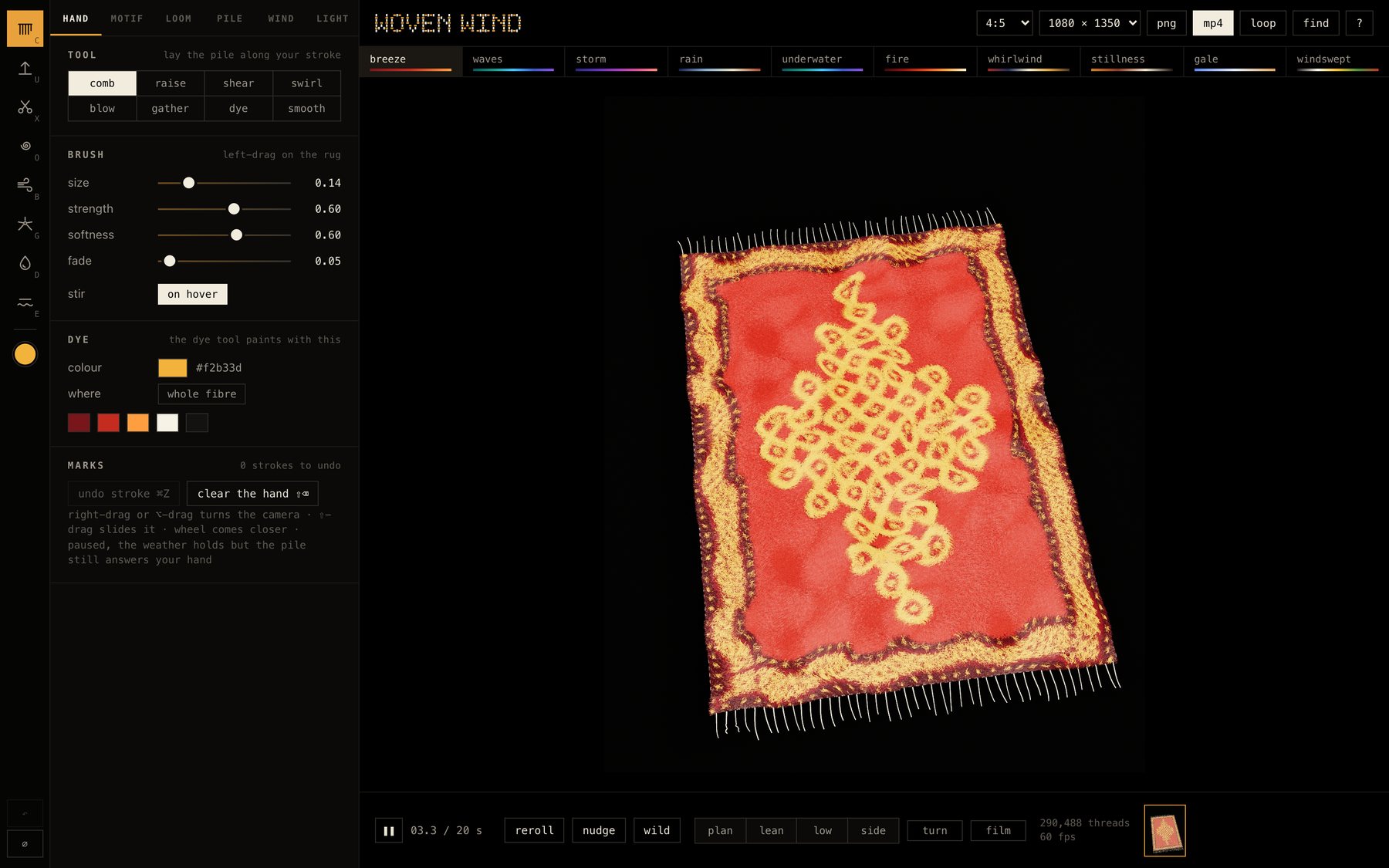
The Woven Wind screen: tools and controls on the left, the save buttons along the top with the moods in a row beneath, the rug in the middle, and the clock, dice, views and history along the bottom
  1. 1
    Tools. The eight hand tools, the dye colour, and undo and clear at the bottom.
  2. 2
    Tabs. hand · motif · loom · pile · wind · light.
  3. 3
    Controls. Every slider and switch for the open tab.
  4. 4
    Moods. Ten weathers in a row of their own. Click one, or press 1 to 0.
  5. 5
    Frame and size. The shape of your picture, and how large it saves.
  6. 6
    Save. png, mp4 from now, or one seamless loop.
  7. 7
    find and ? Find a setting by name, or press /. Every key on one sheet.
  8. 8
    The rug. Drag on it to use the tool. Right-drag or ⌥-drag turns the camera, ⇧-drag slides it, scrolling comes closer.
  9. 9
    Play and clock. Pause the weather; the clock counts through one loop.
  10. 10
    Dice. reroll the motif, nudge the settings, or go wild.
  11. 11
    Views and camera. plan, lean, low and side; turn circles the rug slowly; film lets the camera film it by itself.
  12. 12
    Threads and speed. How many threads are moving, and how many frames a second.
  13. 13
    History. Every look you keep. Click one to go back to it.

The first minute

  1. Open Woven Wind. The rug is already moving in the first mood, breeze.
  2. Drag across the rug. The comb lays the pile along your stroke.
  3. Press 3 for storm, a cyclone. Press ⇧ 3 to bring its cloth too.
  4. Right-drag (or ⌥-drag) to turn the camera. Scroll to come closer.
  5. Press space. The weather holds still, but the pile still answers your hand.
  6. Press P to save a picture, or L for a loop.
Plate 2press 3 · storm