 View decode
Guides · Lab Tools / How-to
Puppet Warp Online, Free: Bend a Picture in Your Browser
Puppet warp online for free: lay a grid on a picture, pin what should stay and drag the rest. Save a PNG or an MP4 of it moving. Nothing is uploaded.
Puppet warp means bending part of a picture by dragging points on a mesh while pins hold the rest still. Mesh warp in the AIKIZI Lab does it in the browser: a grid of points sits on your picture, you pin what should stay, and you drag the rest.
What puppet warp is
The picture is cut into a mesh of small triangles. When you move one corner, every triangle that touches it is redrawn to fit its new shape, so the picture stretches instead of tearing. A pin is a corner that will not move. Pin a shoulder, drag the hand, and the arm bends while the body stays where it was.
In Mesh warp the mesh is a regular grid, and you pick its size: 3 × 3 is nine points for broad bends, 12 × 12 is 144 points for small, close ones. Radius sets how far a drag pulls the points around it, and Strength sets how much they follow.
How to puppet warp a picture online
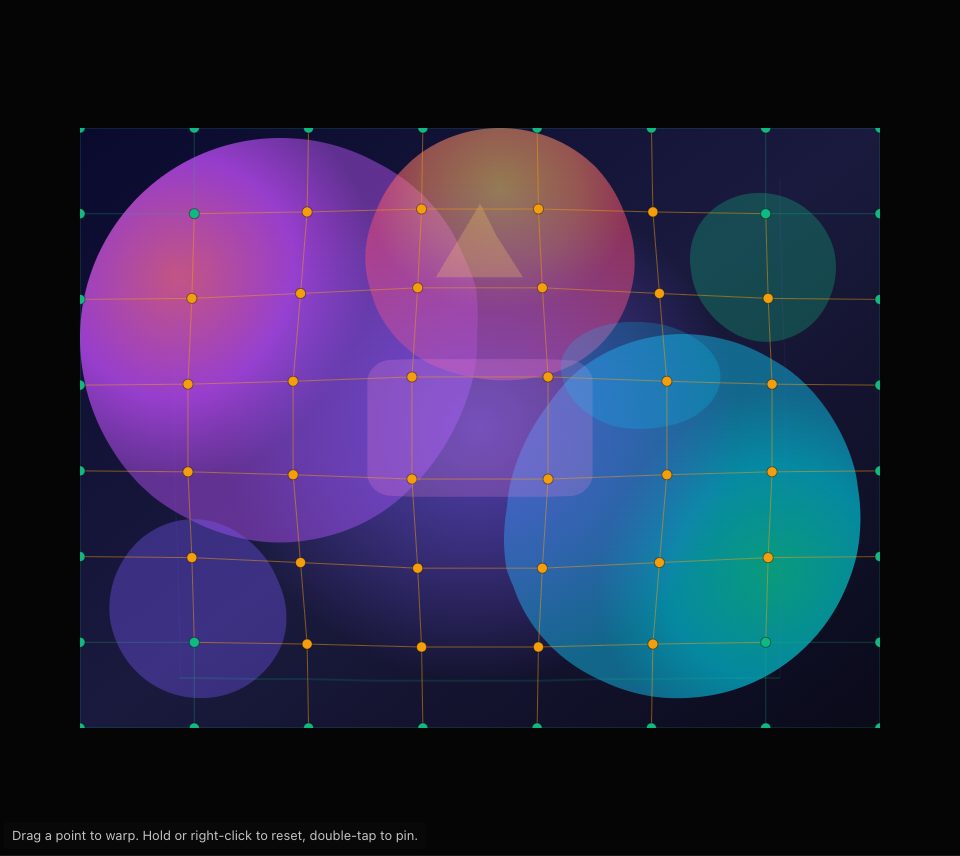
- Open Mesh warp. A sample picture is already there under a 6 × 6 grid of green points.
- Press Image A to open your own picture, or drop it on the frame. Big pictures are fit to 800 pixels on their long side.
- Pick a grid size: 4 × 4 or 5 × 5 to lean a whole figure, 10 × 10 or 12 × 12 for a smile or a curl of hair.
- Double-click each point that must stay still to pin it, or double-tap it on a phone. A pinned point turns red with a white cross.
- Drag a free point and the picture bends around it. Then open Actions and press Save PNG, Copy or Record video.
Undo steps back one change at a time, up to 50. Right-click a point to put it back where it started.
What people make with it
- A pose or proportion fix. Lean a figure, lift a shoulder, or pull a bowed horizon straight in a picture you made.
- A short moving loop. Turn on Animate, pick Wave, Breathe, Flag or Twist, and record the canvas while it moves.
- Bent type for a poster. The presets Bulge, Pinch, Twist, Shear and Barrel bend the whole grid at once, and a few pins keep one word readable.
What it saves
| Button | You get |
|---|---|
| Save PNG | mesh-warp.png at the size of your picture after the 800-pixel fit. Where the bend pulls the edge in, the PNG is see-through. |
| Copy | The same picture on the clipboard, where the browser allows it. |
| Record video | mesh-warp.mp4 (H.264) at up to 30 frames a second, with no sound. Firefox saves a WebM instead. |
The grid and the points never appear in any of the three. The video holds only what changes on the canvas while it records, so turn on Animate or drag points while it runs. There is no time limit on a recording.
The limits, said plainly
Every picture is fit to 800 pixels on its long side before it is bent, on every screen, and the PNG and the video come out at that size. Fine for a post, not for a print. The mesh is a grid, not a shape traced from the outline of a figure, so on a person you place the pins yourself. A preset replaces your bends, and a new grid size or picture starts a fresh grid.
Mesh warp next to desktop software
Photoshop's Puppet Warp, and the copy of it in Photopea, build the mesh from the outline of a layer, let you drop a pin anywhere, and work at the full size of your file inside a layered document. For print work, that is the better tool. Mesh warp is for the quick bend: nothing to install, nothing uploaded, a grid where you can see every point and how far it moved, and a PNG or a moving video in one press.
Common questions
Is there a free puppet warp online?
Yes. Mesh warp is free, needs no account and runs in your browser. The picture is bent on your device and never leaves it.
Is this the same as Photoshop's puppet warp?
Close. Both lay a mesh over the picture, let you pin parts and drag the rest. Photoshop builds the mesh from the layer's outline; here it is a regular grid you pick.
How do I pin or reset a point on a phone?
Tap a point twice quickly to pin it or free it. Hold your finger still on a point for half a second to put it back where it started.
Try it
Open Mesh warp, pin two points and drag a third. When a picture needs a new pose rather than a bend, read Re-pose a character with AI, without changing the face.