 View decode
Guides · Lab Tools / Audio
Microphone Visualizer Online: See Your Voice Live, Free
A free microphone visualizer in your browser: your voice or the room as a live waveform ring, ten modes, nothing recorded. Save a PNG of any moment.
A microphone visualizer draws what your microphone hears, as it hears it. The microphone visualizer in the AIKIZI Lab does this in a browser tab: press Microphone, allow it, and speak, sing, clap or play. The ring answers at once.
What you see
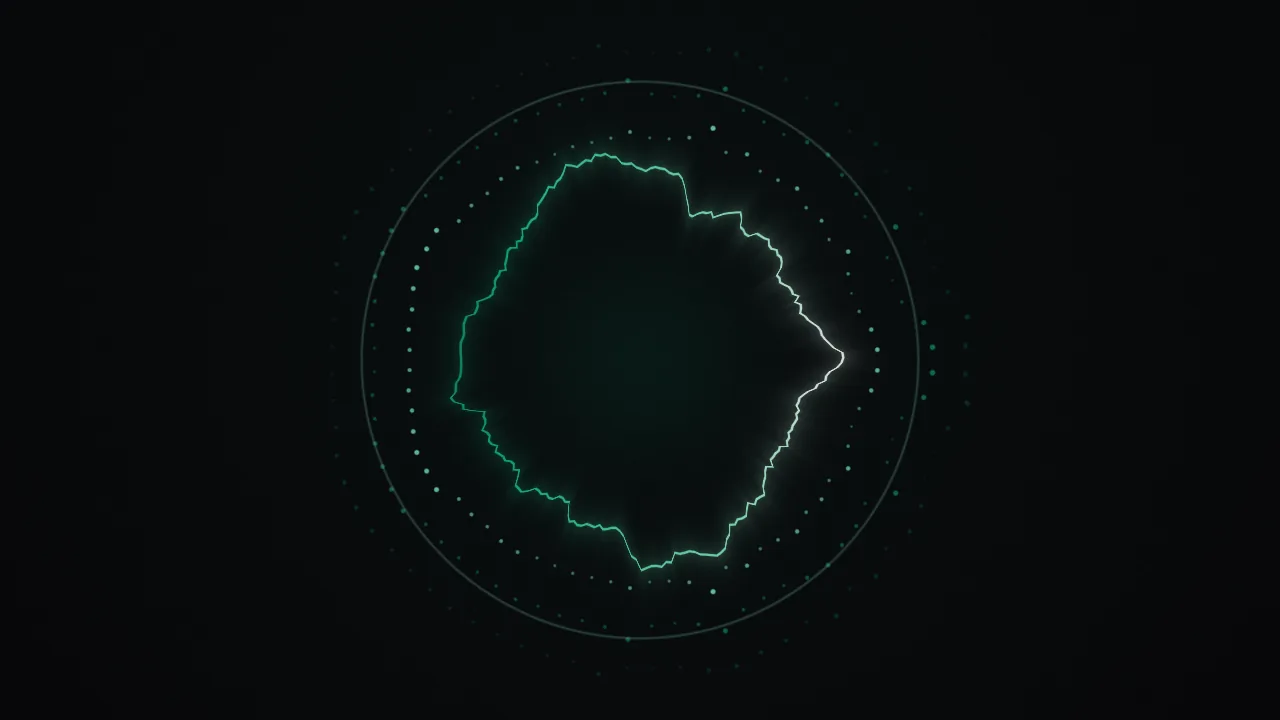
The inner ring is the waveform itself, the shape of the sound wave bent into a circle. The rings around it are the spectrum of the last fraction of a second, so you see both the wave and which pitches are in it. The sound is measured frame by frame on your computer and thrown away. Nothing is recorded, and the microphone is not played back through your speakers.
Why this tool for the microphone
The AIKIZI Lab has ten audio visualizer modes on one engine, and every one of them can listen to the microphone. The microphone visualizer page opens on the waveform ring because it shows the raw wave, which suits a voice. The particle music visualizer is built for a song read from start to end before it plays; a live microphone has no end to read, so the ring is the honest choice.
How to use a microphone visualizer online
- Open the microphone visualizer.
- Press Microphone, and allow it when the browser asks.
- Make a sound: talk, sing, clap, or play an instrument near the computer.
- Switch modes and looks while it listens. Response sets how hard the picture moves.
- Press Save PNG to keep the moment as a picture. Press Microphone again to stop listening.
The other modes read the same sound in other ways: bars of spectrum, a field of particles, folding ink, a spectrogram with pitch from bottom to top, mountain ridges, threads, or falling characters. The spectrogram is the one to use for a held note or a bird call, where a steady pitch shows as a flat line.
What people use it for
- A microphone check. See that the right microphone is live, and how loud you are, before a call or a recording.
- A picture behind a talk or a jam. Put the tab on a second screen and let the ring follow the room.
- A lesson. Show a child or a class what a voice, a clap and a whistle look like side by side.
What it saves
Save PNG keeps the moment on screen at 1080p in the shape you choose, 1920 × 1080 when wide. The microphone cannot be filmed on this page. Its video button draws every frame from a song read in advance, so it needs a song file or the sample, not a live input.
For a video of your voice, use Standing Sound, the 3D visualizer. Its Take button records live, and with the microphone on, your voice or instrument is in the file. How that works is in Free Music Visualizer Video Maker: 4K MP4 for Reels.
The limits, said plainly
The browser has to be allowed to use the microphone. If the ring does not move, press the icon in the address bar, allow it, and press Microphone again. On a laptop, the built-in microphone may be switched off in the system settings. The picture is drawn on your graphics card through WebGPU, or WebGL2 where WebGPU is missing. And there is no video of the microphone here, only the PNG.
Next to desktop software
Streaming and VJ software can take a microphone as an input, draw it, and record or broadcast the result beside your camera, with much more control over the layout. If you stream every week, that is the right home for a visualizer. This page is for a quick look: no install, no account, and the sound never leaves your computer.
Common questions
Is the microphone recorded?
No. The sound is measured frame by frame on your computer and thrown away; nothing is recorded, saved or sent, and the microphone is not played through your speakers.
Why does the microphone visualizer not react?
The browser has to be allowed to use the microphone: press the icon in the address bar and allow it, then press Microphone again. On a laptop, the built-in microphone may be switched off in the system settings.
Can I save a video of the microphone visualizer?
Not on this page; Save PNG keeps a still. Standing Sound records the microphone into its Take.
Is the microphone visualizer free?
Yes. It needs no account, and there is no watermark on the picture.
Try it
Press Microphone, say one sentence, then clap once and watch the ring jump. All ten modes, with a picture of each, are in Free Audio Visualizer Online: 10 Modes, Save as MP4.